1. The Need for Direct STDF Editing & Safe Architecture
In high-volume semiconductor manufacturing, STDF (Standard Test Data Format) is the binary raw log streamed directly by ATE testers. Operator errors (such as mismatched lot IDs or test program names that cause MES/EDC upload rejections), prober orientation mismatches, and bin classification glitches are common headaches for test and yield engineers.
Historically, fixing these issues required dumping multi-hundred megabyte STDF files into ASCII ATDF, manually editing line-by-line, re-compiling, or writing fragile custom Python scripts. DLOG eliminates this friction by enabling engineers to open binary STDF V4 files directly, modify records inside an intuitive GUI, and save clean, spec-compliant binary files back to disk.
All modifications in DLOG take place exclusively in memory. Edits immediately propagate across yield summaries, Pareto charts, wafer maps, and histograms, but the original disk file remains 100% untouched. Changes are committed to disk only when you explicitly run Save STDF. Every edit can be undone or reapplied instantly via Ctrl + Z (Undo) and Ctrl + Y (Redo). If you close the document or open another file while unsaved edits remain, a prompt will appear offering three choices: Save STDF (save before proceeding), Discard edits (discard changes and continue), or Cancel (stay in the current document).
Tools & Export Menu Hierarchy
The Tools and Export menus located in the top-right corner serve as the centralized command center for data correction and output.

Undo/Redo, with Delete Earlier Retests and Delete Duplicate Parts at the bottom.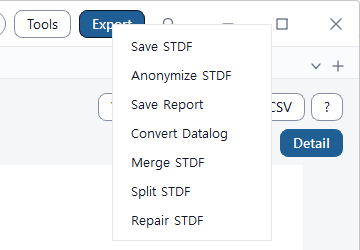
Command Selection Guide by Scenario
| Task Objective / Scenario | Command to Use | Target Scope & Records |
|---|---|---|
| Lot ID, tester ID, wafer size, or test limit metadata errors | Edit STDF Info |
MIR, WIR, WCR, SDR, SBR, HBR, TSR, MRR records |
| Fixing a single die's bin verdict, test value, or coordinates | Edit Result |
Single part (accessed from Table view or Wafer map) |
| Modifying hundreds or thousands of parts by condition / shifting coordinates | Bulk Edit |
Parts matching conditional filters (Site, Bin, Result, Parametric limits) |
| Fixing discrepancies between limits, measured values, and bin definitions | Quick Fix |
Auto-detected contradictions with one-click Recommended solutions |
| Clearing earlier re-probed touchdown records at identical die coordinates | Delete Earlier Retests |
Wafer sort retest history (preserves final insertion) |
| Purging duplicate parts based on serial number (PART_ID) or text (PART_TXT) | Delete Duplicate Parts |
Lot or wafer-scoped duplicate parts (keep last or first) |
2. Edit STDF Info (Lot Headers & Record Metadata)
The central dialog for inspecting and modifying core STDF V4 metadata. Select any category from the left navigation pane to update the corresponding record fields.
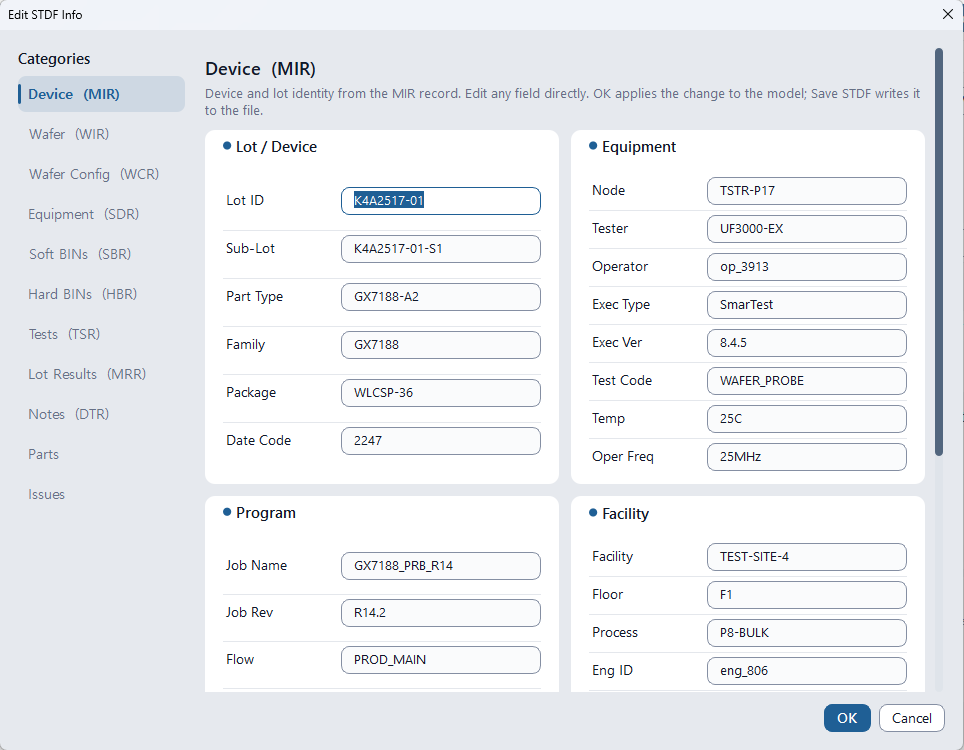
8 Core Metadata Categories
| Category | Underlying STDF Records | Editable Key Fields |
|---|---|---|
| Device | MIR (Master Information) |
Lot ID, Sublot ID, Part Type, Package Type, Test Program, Tester Type, Operator, Node Name, Process ID, Facility ID |
| Wafer | WIR / WCR |
Wafer ID, Wafer Diameter (mm/inch), Die Width / Height, Flat/Notch orientation, wafer center coordinates |
| Equipment | SDR (Site Description) |
Handler / Prober ID, Probe Card ID, Load Board ID, DIB ID, Interface Cable, Contactor Socket IDs |
| Soft BINs / Hard BINs | SBR / HBR |
Bin number, Bin name, Pass/Fail definition. Add BIN, Delete BIN, automatic merging on number collision |
| Tests | TSR (Test Synopsis) |
Test Name, Low Limit, High Limit, Units, Scaling factor. Delete this test excludes test from file output |
| Lot Results / Notes | MRR / DTR |
Disposition code (DISP_COD), execution summary (USR_DESC), engineer datalog notes |
| Parts | PRR / PIR |
Filter All/Fail/Deleted parts. Double-click any row to open the granular Edit Result dialog |
| Issues | Validation Engine | Live warnings of limit violations or bin inconsistencies before file saving, with direct Quick Fix links |
- Bin Definition vs Part Verdicts: Modifying bin definitions triggers "Move the parts too?". Choosing Yes updates all parts mapped to that bin; choosing No only updates the header table, potentially creating data inconsistencies.
- Deleting In-Use Bins: Bins currently assigned to one or more parts cannot be deleted. Entering an existing bin number will automatically merge the two bins.
- Test Limit Updates: Modifying high/low limits in TSR does not automatically flip existing part Pass/Fail verdicts. Run Quick Fix or Bulk Edit after changing limits to reconcile verdicts.
- Delete This Test: Only PTR (parametric) tests can be purged. If a part's only failure was on that test, DLOG prompts whether to Delete only (keeps part FAIL) or Delete + move BIN to PASS.
3. Edit Result (Fine Part & Value Editing)
Fine-tune individual die test results on a wafer sort map or packaged final test units.

Access Methods
- Table View: Double-click any part row, or select a row and choose Tools > Edit > Edit Result.
- Wafer Map: Select any die and click edit on its tooltip card.
- Edit STDF Info: Double-click any row in the
Partstab.
Editable Part Properties
- Soft BIN / Hard BIN: Software program bin and hardware handler sorting bin.
- Result: Force toggle Pass/Fail verdict.
- X / Y Coordinates: Correct die wafer coordinates.
- Test Time: Part test execution duration (ms). Leave blank for unrecorded.
- Part ID: Unit serial numbers and 2D barcode identifiers.
- Delete Checkbox: Flag parts to be omitted from all reports, yields, and binary saves.
Parametric Items Grid
Inspect all PTR (parametric) and MPR (multi-pin) tests alongside their specification limits.
| Action | Function & Behavior |
|---|---|
| Double-click value or press F2 | Directly edit measured numeric value. Recalculates provisional Pass/Fail based on limits. |
| Double-click Pass/Fail or press Space | Manually override test verdict regardless of measured numerical value. |
4. Bulk Edit (Conditional Batch Editing & Coordinate Shifts)
Filter thousands of parts based on defect criteria, site, or parametric test ranges to batch-update bins, mark deletions, or invert/rotate wafer coordinate grids.

3-Step Batch Workflow
-
Define Target Conditions (Target parts):
Enable criteria such asSoft BIN =,Hard BIN =,Result =,Site =,Item value(Low~High range with Inside/Outside modes), orItem is FAIL. Parts must satisfy all enabled conditions (AND). CheckWhole scopeto select all parts. -
Preview Targets (View targets...):
ClickView targets...before applying to inspect the exact part count and list. -
Select Action & Apply:
Select the operation, configure parameters, and clickApply.
Supported Batch Actions
| Action | Description | Production Use Case |
|---|---|---|
Change BIN |
Batch-update Soft BIN and Hard BIN assignments | Reclassifying defect clusters or unifying failure bins |
Set result |
Force verdicts to PASS or FAIL | Batch-failing reliability screening reject units |
Delete / Restore parts |
Flag matching parts as deleted or restore them | Excluding edge dummy dies or faulty test site data |
Set item value |
Replace measured values with a constant, offset addition, or multiplier | Calibrating tester gain or systematic channel offset errors |
Move DIE coordinates |
Shift coordinates by offset, Invert X, Invert Y, Swap X/Y axes | Correcting prober notch misalignment and inverted origin axes |
Correcting inverted or rotated wafer maps caused by prober setup mistakes:
- Offset: Moves all dies when the prober center origin was misindexed.
- Invert X / Invert Y: Corrects mirrored wafer mounting when notches or flat zones were reversed.
- Swap X/Y Axes: Reverses miswired prober motor axes. Combining axis swapping with inversion enables 90° and 270° rotations.
5. Quick Fix (One-Click Data Contradiction Resolution)
A frequent issue in ATE datalogs is internal contradictions — such as measured values within spec limits marked as FAIL, or parts assigned to PASS bins having FAIL verdict flags. DLOG's Quick Fix engine scans the entire lot, groups inconsistencies into actionable solution cards, and recommends the safest path forward.
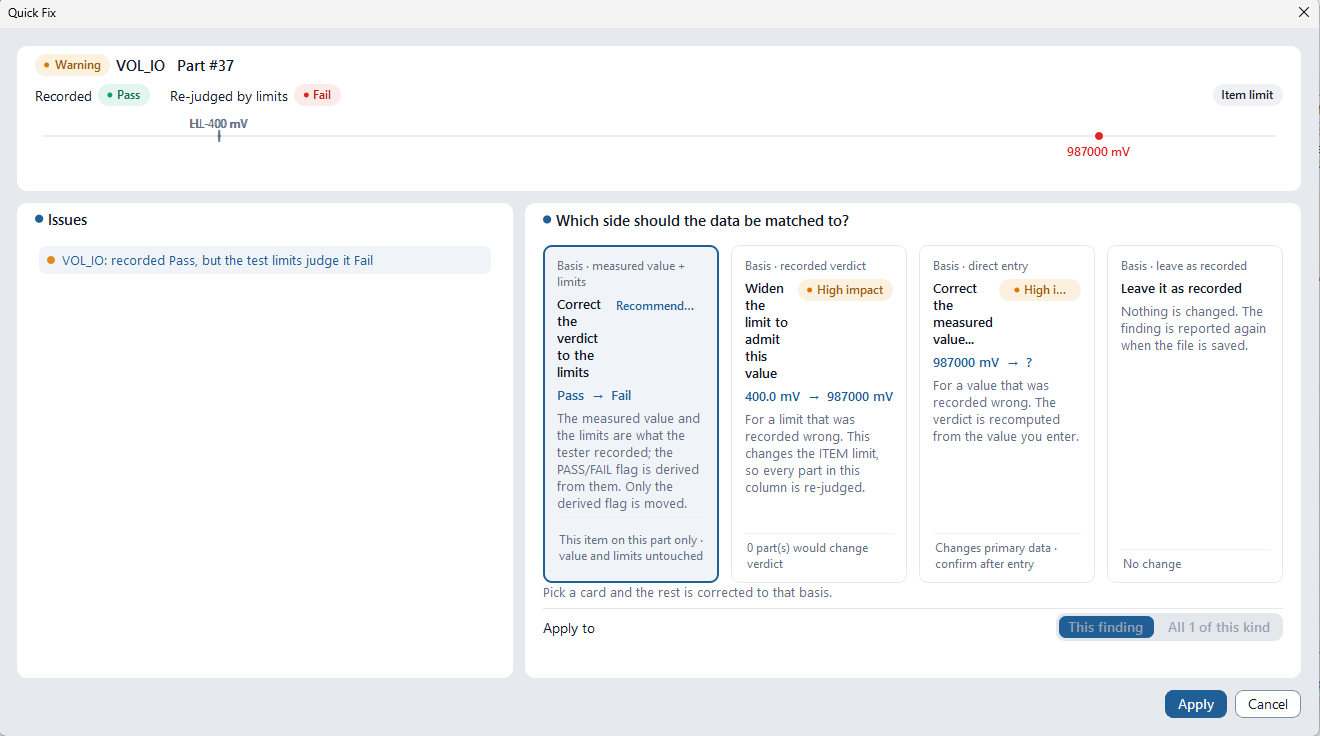
Detected Discrepancies and Resolution Cards
Only cards corresponding to detected contradictions are shown (4 in the example above). If no discrepancies exist, "No consistency issues found." is displayed.
| Solution Card | Operation & Scope Impact | Recommended Usage |
|---|---|---|
Correct the verdict to the limits |
Keeps measured values and limits; updates PASS/FAIL flags to match limits | When test limits are correct but tester flags glitch RECOMMENDED |
Widen the limit to admit this value |
Expands test limits to accept the value. Triggers recalculation for all parts on this test | When test program spec limits were set too narrow HIGH IMPACT |
Correct the measured value... |
Sets a corrected numeric value and recalculates verdicts | When an obvious unit glitch or decimal error occurred |
Match the part verdict to the bin |
Synchronizes part Pass/Fail verdict with the defined SBR/HBR bin nature | When bin assignment is correct but part verdict flag is missing |
Edit bin numbers / Change declaration |
Moves parts to valid bins or updates the header bin definition table | When SBR/HBR header tables conflict with part records |
Accept this as a real measurement |
Clears NOTEST flag and performs standard evaluation against limits | When valid test values were mistakenly flagged as NOTEST |
Leave it as recorded |
Leaves raw datalog records untouched | When preserving intentional debug contradictions |
Each card features badges to guide your decision. The Recommended badge marks the program's recommended choice, while the High impact badge warns that many parts' pass/fail decisions and yield could be altered at once—verify the impact scope before applying. At the bottom, choose This finding (fix only the selected occurrence) or All N of this kind (batch-fix all instances of this anomaly) to eliminate tedious repetitive work.
6. Retests & Duplicate Parts Purge
In high-volume wafer probing and package testing, contact failures, handler re-insertions, and re-transmitted files often cause duplicate records for identical dies or package units.
DLOG provides two dedicated purification tools: coordinate-based Delete Earlier Retests and identifier-based Delete Duplicate Parts.
6.1 Delete Earlier Retests (Coordinate-Based Retest Purge)
In wafer sort testing where identical die coordinates (X, Y) are probed multiple times, this command preserves only the final touchdown (Last Insertion) and permanently purges earlier 1st/2nd attempts from memory.
Workflow & Operations
-
Launch Command (Tools > Edit > Delete Earlier Retests):
DLOG scans multi-touchdown die coordinates per wafer and prompts with the exact count of obsolete records to be removed. -
Preserve Final Insertion:
Confirming removes earlier records from memory while retaining the final test result. -
Real-Time Yield & Map Sync:
Yield summaries, Pareto charts, and wafer maps update immediately. Undoable anytime via Ctrl + Z.
If an initial touchdown was PASS but a subsequent retest failed, this purge retains the final FAIL record. Confirm whether company policy accepts earlier passes before executing.
6.2 Delete Duplicate Parts (Identifier-Based Duplicate Purge)
Identifies and removes duplicate parts sharing identical identifiers (PART_ID or PART_TXT) regardless of coordinate availability. Essential for package Final Test (FT) where coordinates do not exist, as well as wafer sort lines tracking global 2D barcode / ECID serial numbers.

Delete Duplicate Parts command located directly under Delete Earlier Retests.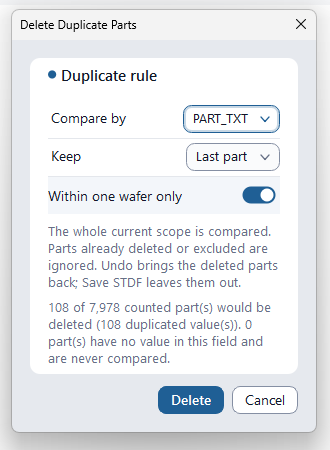
PART_TXT.3 Core Duplicate Rules
Default values are applied on first launch. Clicking Delete remembers these options for subsequent sessions (Cancel discards changes).
| Rule Option | Selection Values | Operating Principle & Practical Notes |
|---|---|---|
| Compare by | PART_ID Default |
Evaluates duplicate status using unit serial numbers (2D barcode / ECID). Case-sensitive, trimmed of leading/trailing whitespace. |
PART_TXT |
Evaluates duplicate status using user text fields. Check preview counts carefully as PART_TXT is not guaranteed to be unique. | |
| Keep | Last part Default |
Retains the last recorded part in file serialization order (PRR sequence) and marks earlier duplicate instances for deletion. |
First part |
Retains the first recorded part in file serialization order and marks subsequent duplicate instances for deletion. | |
| Within one wafer only | ON (Switch Enabled) Default |
Restricts comparisons within identical WAFER_ID groups. Crucial for wafer sort lots where PART_ID resets from 1 to N on every wafer, preventing accidental cross-wafer deletions. |
OFF (Switch Disabled) |
Compares parts across the entire current scope. Use when tracking unique lot-wide global barcodes. (Final test FT data without wafer information is unaffected) |
Parts with empty or missing values in the chosen field (
PART_ID or PART_TXT) are never treated as duplicates and remain safely preserved. Only parts with identical, non-empty string values form duplicate groups.
Adjusting options updates the live preview: "%d of %d counted part(s) would be deleted (%d duplicated value(s)). %d part(s) have no value in this field and are never compared." If zero duplicates exist, the Delete button is disabled. Executing a purge is committed as a single transaction undoable via Ctrl + Z. Running Save STDF permanently omits purged part record clusters (PRR/PTR/MPR), exporting a clean, purified binary file.
7. Save STDF & Anonymize STDF (Binary Serialization & IP Masking)
Re-serialize modified in-memory lots into compliant binary STDF V4 files or create masked copies to share with external foundries or vendors without leaking proprietary intellectual property.


Save STDF (Binary Output)
Writes modified part verdicts, updated headers, and adjusted coordinates into a fresh binary .stdf file.
A pre-flight Issues audit dialog pops up immediately prior to writing to confirm data consistency.
- Single File Prerequisite: Only available when exactly one binary STDF file is open (disabled for ATDF text logs or multi-lot aggregated documents).
- Retest Mode Integration: When the top Retest selector is set to
Collapsed(default), earlier superseded retest rows are omitted, keeping output files lean. Switch toAll insertionsif full historical probing runs must be preserved.
Anonymize STDF (Intellectual Property Protection)
Generates clean, sanitized datalogs for external OSATs, third-party failure analysis labs, or equipment vendors.
- Anonymization Scope: Replaces Lot ID, Sublot ID, Test Program Name (and Revision), Device/Part Type, Node Name, Operator, Test Item Name, and Bin Name (name only; Bin numbers are preserved) with safe, non-identifying aliases. Single-wafer files also have their Wafer ID replaced.
- Preserves Parametrics: Real measured voltage/current values, distribution statistics, wafer die coordinates, and Cpk curves remain 100% unaltered for valid external analytical modeling.
- Automatic Key Mapping: A reversible mapping table (CSV) cross-referencing original identifiers with their synthetic aliases is saved alongside the anonymized copy. Keep the mapping CSV securely internally and never distribute it externally.
Files containing MPR/FTR records (which may expose pattern or pin names) or STDF V4-2007 scan records (STR/PSR/NMR, etc.) cannot be anonymized for intellectual property protection. For multi-wafer files,
WAFER_ID is preserved to distinguish wafers; if you need to conceal Wafer IDs as well, first split the file with Split STDF and anonymize each wafer individually. (DTR/GDR freeform text records are automatically stripped, and PART_TXT is cleared.)
8. Repair STDF (Truncated Stream Recovery Engine)
Recovers truncated or structurally corrupted STDF datalogs caused by abrupt tester crashes, BSODs, network dropouts, or filled disks.

Core Repair Capabilities
- Headless Direct File Execution: Operates directly on disk files, allowing recovery of severely corrupted files that cannot be opened in standard viewers. (Triggered directly via the STDF Repair Needed dashboard notification pill)
- Bit-Level Record Boundary Re-synchronization: Follows record header structures (2-byte length + 1-byte type + 1-byte subtype) to re-establish valid record boundaries, isolating corrupt byte sequences and salvaging as many valid part records (PIR/PTR/PRR) as possible.
- Rebuild Missing Summary Records: When truncated file ends lose
MRR,PCR,SBR,HBR, andTSRsummary records, DLOG recalculates statistics from the salvaged parts and synthesizes compliant summary records adhering to STDF V4 specifications. - Transparent Recovery Reporting: The completion dialog details salvaged parts count, retained vs. synthesized records count, skipped corrupt byte count, and key findings (
INFOlogs document regenerated headers and summaries complying with the specification). If large gaps were skipped, an explicit warning alerts you that some parts may be omitted. - Self-Validation Guarantee: Immediately re-parses the repaired output; if validation fails, the damaged file is discarded rather than leaving a faulty datalog.
Repair supports binary STDF (
.stdf / .std) only, and the repaired data is always written to a distinct new file (default name <filename>_repaired.stdf).
Summary counts in the repaired file are recalculated exclusively from salvaged parts, reflecting the recovered subset rather than the original uninterrupted test.
Because Repair reads directly from the on-disk file, unsaved in-memory edits in the currently active document are not included in the repaired file.
9. Split & Merge STDF Datalogs
Partition massive lot logs into manageable subsets or consolidate multiple test run fragments into a single unified STDF file.


Split STDF (Subsetting Datalogs)
Split large single-file datalogs into independent files:
- By Wafer: Generates one file per wafer (parts outside wafer records are saved to
NOWAFER). - By Site: Isolates parallel multi-site test channels (Site 1, 2, 3...) to diagnose site-to-site hardware offsets.
- By Head: Splits multi-head tester sessions into individual test head files.
- Every N parts: Splits by uniform part counts while keeping retested die attempts grouped in the same file.
Records that do not belong to a specific part are copied to all output files. If all parts belong to a single group, DLOG will notify you that there is nothing to split. Files where wafers from two heads are active simultaneously or files with non-part PRRs (such as test plan delimiters) cannot be split at this time.
Merge STDF (Consolidating Datalogs)
Rather than crude binary concatenation, DLOG retains only the primary headers (MIR, WCR, SDR, pin map) from the first file, copies all part byte streams verbatim across all files, and comprehensively recalculates PCR (part count), SBR/HBR (bin totals), and TSR (per-test min/max/sum) summary records from scratch. Select two or more STDF files in the file dialog and specify the output name; when explicit chronological ordering is required, use the CLI's merge command (which merges in exact specified order).
Merge is rejected if input files have differing test suites, byte orders (Endianness), STDF versions, conflicting pin map definitions, mismatched wafer geometry (WCR), or unpaired wafer records (repair must be run first). ATDF files cannot be merged, and results exceeding 2 GB are rejected. If the merged output fails automated self-validation re-parsing, the output file is safely removed. If lot header metadata differs across input files, only the first file's metadata is preserved. If individual files share duplicate sequential part numbers (PART_ID: 1, 2, 3...), downstream tools may misinterpret later parts as retests—verify identifiers beforehand. Merge, Split, and Repair read directly from disk; unsaved in-memory edits are not included in their output.
10. Convert Datalog & CLI Headless Automation
Integrate DLOG's editing and conversion capabilities into production line servers, CI/CD pipelines, and automated yield analysis scripts.

Industry Standard Format Conversions
| Output Format | Extension / Standard | Features & Target Systems |
|---|---|---|
| CSV | .csv (UTF-8 BOM) |
One row per part, tests mapped to columns for Excel, Python pandas, and SQL databases |
| SINF | .sinf |
KLA inkless wafer bin map standard (one file per wafer) |
| SEMI G85 | .xml |
International SEMI standard wafer map XML for die bonders and pick-and-place equipment |
| SEMI E142 | .xml |
Advanced packaging substrate and multi-chip module map standard |
| JSON | .json |
Structured yield summaries, bin tallies, and Cpk metrics for REST APIs and web dashboards |
SINF, G85, and E142 can only be generated for lots containing die coordinates, and multi-wafer STDF files are skipped for these wafer-centric formats. Skipped files and reasons are reported in the completion dialog. JSON output defaults to a summary (lot metadata, yield, bins, test list, statistics); enable
Include every part in the JSON to export full per-part parametric measurements (significantly increases file size).
You can also apply Reclassify (PAT · GDBN · CD) prior to conversion.
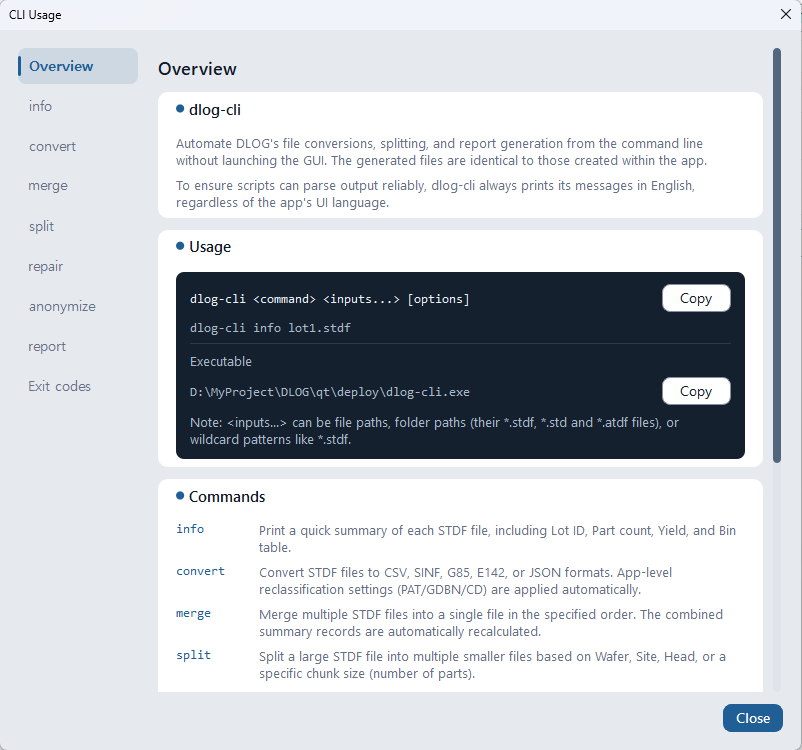
dlog-cli.exe Scripting
The bundled dlog-cli.exe executable runs headlessly in command prompts, PowerShell scripts, and automated cron jobs:
dlog-cli info <inputs...> [--json]: Instantly print Lot ID, yield, part counts, and bin summariesdlog-cli convert <inputs...> --format csv,sinf,g85,e142,json: Batch convert datalogs to target formatsdlog-cli merge part1.stdf part2.stdf --out merged.stdf: Merge files in exact specified sequencedlog-cli split <file.stdf> --by wafer|site|head|chunk [--out <folder>]: Split by wafer, test site, test head, or part count (--parts N)dlog-cli repair broken.stdf: Recover corrupt files, generatingbroken_repaired.stdfalongsidedlog-cli anonymize lot1.stdf --out D:\share: Generate sanitized clone (_anon.stdf) and mapping CSVdlog-cli report <inputs...> --format pdf,xlsx,docx,image: Headless automated report generation
Inputs support individual files, folders (processing all *.stdf, *.std, and *.atdf within), and wildcards like *.stdf.
Existing output files are not overwritten without --overwrite (exits with code 4). CLI messages are always emitted in English regardless of system locale.
For complete command options and exit code definitions, refer to Tools > Help > CLI Usage within the application.
11. Frequently Asked Questions (FAQ)
Q1. When I modify an STDF in DLOG, does it overwrite the original disk file?
No, it never automatically overwrites your original file. DLOG utilizes a strictly non-destructive in-memory architecture. All edits exist only in PC RAM until you explicitly choose Tools > Output > Save STDF and select a destination. If you attempt to close the document or open another file with unsaved modifications, a confirmation dialog appears first. Note that if you explicitly select the original filename when saving, it will overwrite the file, so save to a new filename or keep a backup of the original.
Q2. Will STDF files edited and saved in DLOG open correctly in third-party commercial tools (JMP, YieldHub, Galaxy, etc.)?
Yes, they generally open without issue because they are saved in standard STDF V4 format. DLOG strictly re-serializes record lengths, type/subtype codes, and pin mapping tables in compliance with the STDF V4 binary standard, and automatically re-reads the saved file to verify structural integrity. However, because proprietary parsing nuances exist across various commercial software, we recommend verifying critical data in your target analysis tool.
Q3. What is the difference between Quick Fix and Bulk Edit?
Quick Fix is an automated data inconsistency resolution tool that detects logical contradictions (e.g., measured values within limits marked as FAIL, or bin nature mismatches) and provides one-click standardized solutions.
Bulk Edit is a batch operational engine that allows engineers to filter parts by custom criteria (specific sites, measurement ranges) to batch-reclassify bins or shift and rotate wafer coordinate axes.
Q4. Can DLOG recover STDF files if the tester crashed mid-wafer?
Yes. Repair STDF can recover most truncated files.
DLOG strips incomplete terminal byte sequences, rescues intact part records, and synthesizes missing PCR, SBR, HBR, and TSR summary records to produce a fully validated STDF file.
Q5. What should I keep in mind when merging STDF files?
Merged files must come from the same test program configuration and share identical TSR test item lists and byte order. Additionally, ensure that serial PART_ID schemes do not collide to avoid downstream records being misidentified as retests.
Q6. How does Delete Earlier Retests differ from Delete Duplicate Parts?
Delete Earlier Retests is a coordinate-based cleanup tool for wafer sort testing that purges earlier touchdown attempts at identical die coordinates (X, Y), keeping only the final insertion.
Delete Duplicate Parts is an identifier-based cleanup tool that groups parts sharing identical PART_ID (serial number/barcode) or PART_TXT strings and retains either the last or first part. It works across both wafer sort and final test package data without requiring die coordinates.
Take Full Control of Your STDF Datalogs with DLOG Today
From lot header corrections and batch coordinate transformations to one-click contradiction fixes, duplicate part purging, and bit-level file recovery — solve complex semiconductor test data challenges in just a few clicks. Enjoy 6 months of unrestricted, full-featured access for free.
Download DLOG Free for 6 Months →