What Reports Can You Save?
DLOG can generate reports from your open STDF in 5 formats. Choose only the formats suited for your purpose. Enabling multiple formats creates all of them simultaneously in a single export.
PDF Report
Finished documents for executive reporting, printing, and email
A beautifully formatted document with tables, charts, and wafer maps laid out for presentation. Recipients can open and review it without any extra software.
Excel Report .xlsx
When sorting, filtering, and recalculating numbers
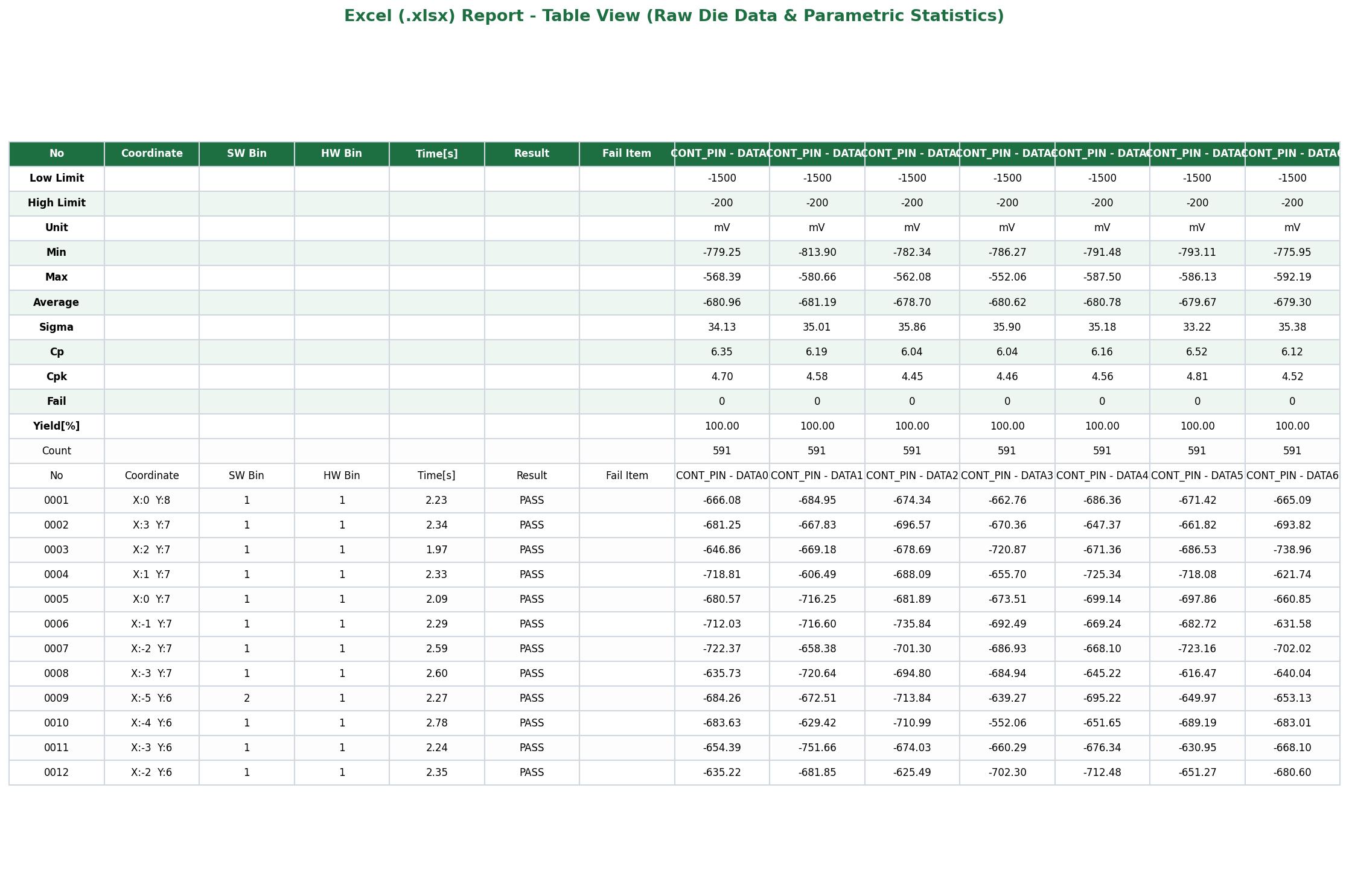
Generates an Executive Summary sheet and filterable/sortable per-item statistical sheets. Numerical tables replace charts, and the Wafer Bin Map is rendered directly on a die coordinate grid sheet.
Word Report .docx
When editing content or adding commentary
Saves the same contents as the PDF into a fully editable Microsoft Word document. Perfect for adapting into corporate templates and adding engineering remarks.
Image Report .png / .jpg
For direct pasting into presentation slides and messengers
Exports the entire report as a single, tall image file. Resolution can be selected from Small up to X-Large.
PAT Report .pdf
Reviewing Part Average Testing outlier limits
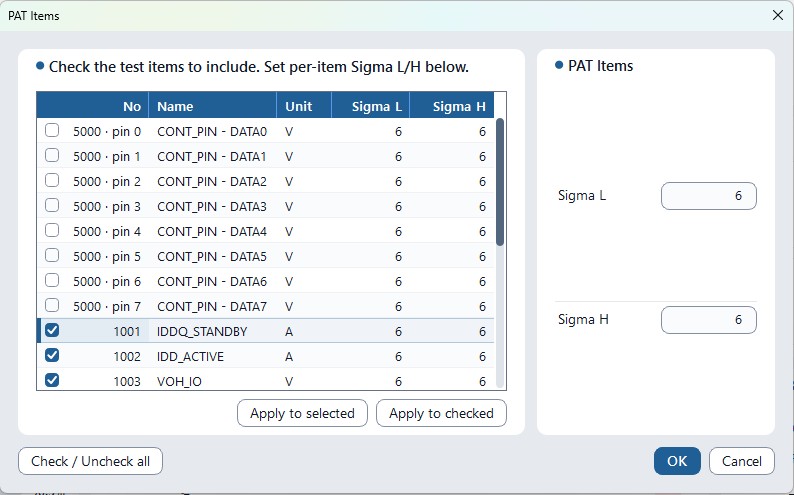
A dedicated standalone PDF containing a PAT limit chart page for each selected test parameter. Choose your target parameters in the PAT Items dialog during export.
Single vs. Lot
Selected independently per format
Single creates 1 report per open file; Lot aggregates all open files into 1 consolidated lot report.
How to Save (4 Simple Steps)
- Click [Save Report] in the top toolbar.
- In Reports to save, toggle on your desired formats (choose Single or Lot).
- In Report sections, choose which sections to include. You can leave the defaults as they are.
- Verify the Folder destination and click [Save Report] to export under the datalog name (prompts to overwrite if duplicate). Once finished, open the files or destination folder directly from the results dialog.

1. Format Comparison at a Glance
If you are wondering which format to choose, refer to the table below. All formats are generated entirely on your local PC, and saved files appear only in the directory you select.
| Format | File | Visuals (Charts · Wafer Maps) | Editable? | Best Used For |
|---|---|---|---|---|
| PDF PDF | .pdf |
Included | No (Read-only) | Customer delivery, formal reports, printing, email attachments |
| XLS Excel | .xlsx |
None — replaced with data tables (Wafer Bin Map provided as die coordinate sheet) |
Yes (Sort · Filter · Formulas) | Secondary numerical analysis or importing into internal fab databases |
| DOC Word | .docx |
Included | Yes (Document editing) | Adapting to company templates or adding engineering commentary |
| IMG Image | .png / .jpg |
Included (Single tall image) | No | Quick sharing in presentation slides, wikis, or messengers |
| PAT PAT (PDF) | .pdf |
PAT limit charts | No | AEC-Q001 Part Average Testing outlier limit review per selected test |
• Single: Generates 1 report for each open STDF file.
• Lot: Aggregates all open STDF files into 1 consolidated lot report.
Automate report generation without the GUI using
dlog-cli report file.stdf --format pdf,xlsx,docx,image. PAT reports can be exported by selecting target items in the desktop app's Save Report dialog.
2. Selecting Report Content (Up to 34 Sections)
Toggle analytical content on or off under Report sections on the right side of the Save Report dialog. There are 34 sections in total, and you can enable or disable them all at once using the All / None buttons. If unsure, saving with the default configuration is recommended.
13 Core Sections (Default)
Essential contents required for almost every report, such as basic lot metadata, yield, and fallout summaries.
- Summary & Info: Executive Summary, Information, Wafer Information, Test Time & Throughput
- Yield & BIN: BIN Summary, Fail Pareto, Site Yield, Yield Comparison*, Per-File Breakdown*
- Statistics & Wafer: Test Item Statistics, Wafer Map, Gallery, Gauge R&R
21 Optional Sections (Engineering Deep Dive)
In-depth sections added when investigating failure mechanisms and statistical distributions.
- Trends & Distributions: Yield Trend, Test Time Trend, Histogram (Worst Cpk), Cpk Ranking, Limit Audit
- Root Cause Analysis: Root Cause Highlights, Failure Enrichment, Test Efficiency, First-Fail Waterfall, Group Analysis, Correlation Explorer, PVT Corner*, Functional (FTR)
- Wafer Maps: Wafer BIN Map, Reticle Average Map, Wafer Diff Map
- Traceability & QA: Site Statistics, Retest Analysis, Part Count (PCR), Datalog Notes, PAT Reject Breakdown
3. PDF Executive Summary & Lot Information
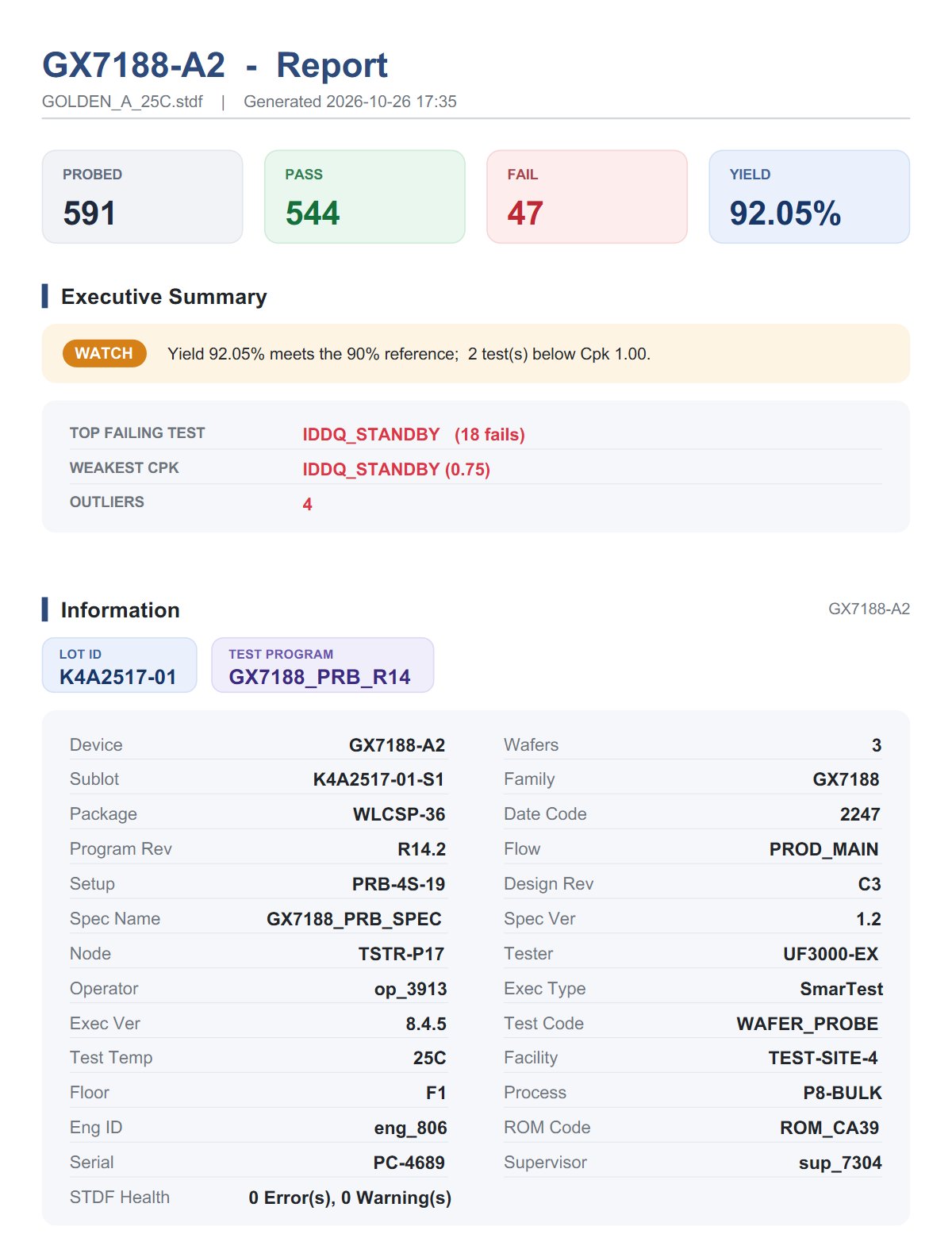
Page 1 delivers high-level visibility for management and operations leads. Large KPI indicator cards and automated status verdicts allow instant lot disposition.
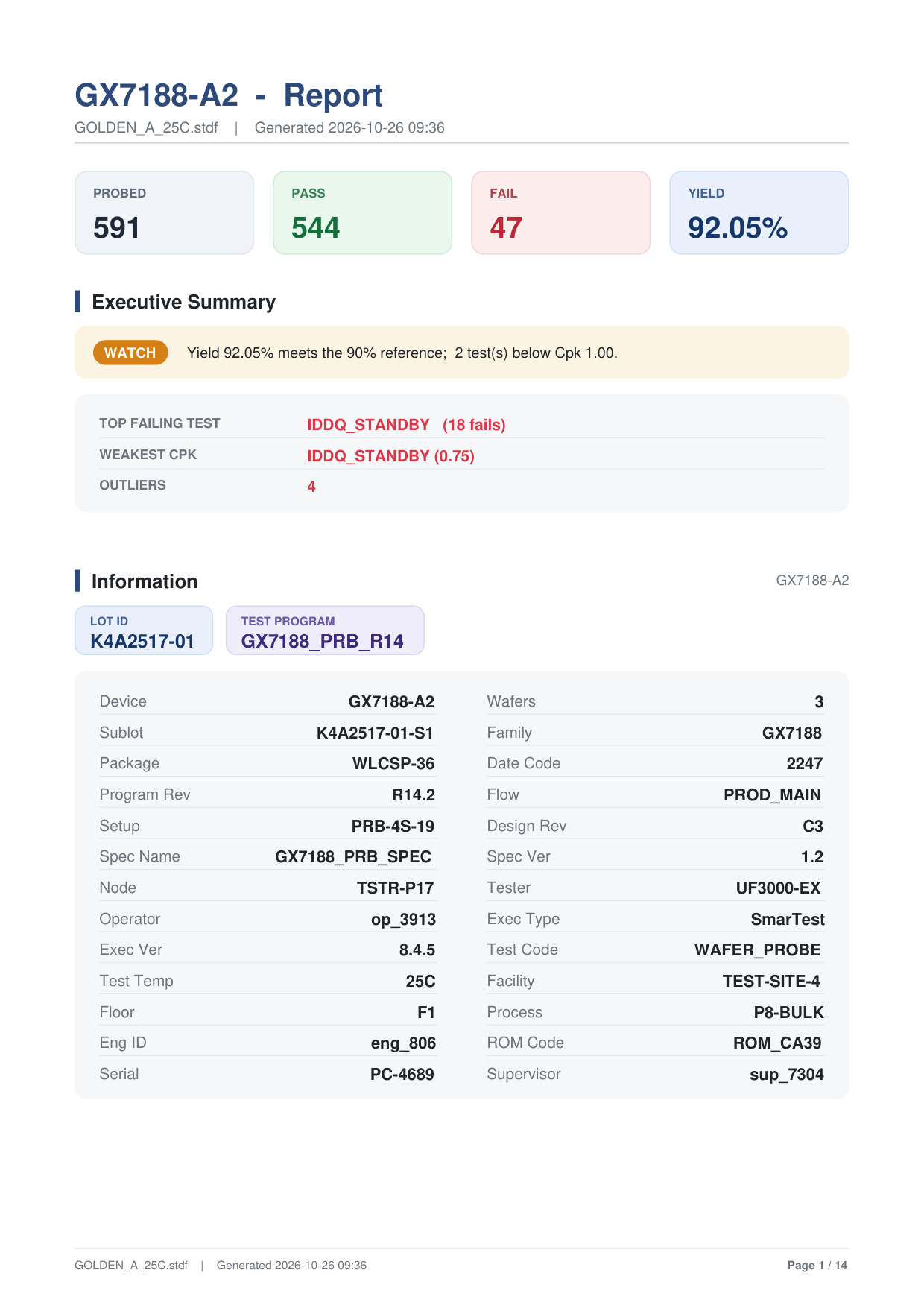
Executive Summary Diagnostic Verdicts
- Status Verdict:
WATCH— Yield (92.05%) meets the 90% reference target, but 2 parametric tests fell below Cpk 1.00, requiring monitoring. - Top Failing Test:
IDDQ_STANDBY(18 fails). - Weakest Process Capability:
IDDQ_STANDBY(Cpk 0.75, sub-capable). - Outliers: 4 die measurements flagged outside 3-sigma boundaries.
- Full Lot Traceability: Lot ID (K4A2517-01), Test Program (GX7188_PRB_R14), Tester (UF3000-EX), Temperature (25°C), Operator, Engineer, and Date Code extracted directly from STDF MIR/MRR records.
4. Test Time & SW/HW Bin Summary
Maximizing ATE asset utilization requires precise tracking of test time throughput and execution variance across parallel probe sites. Page 2 visualizes cycle times alongside software and hardware bin share bars.
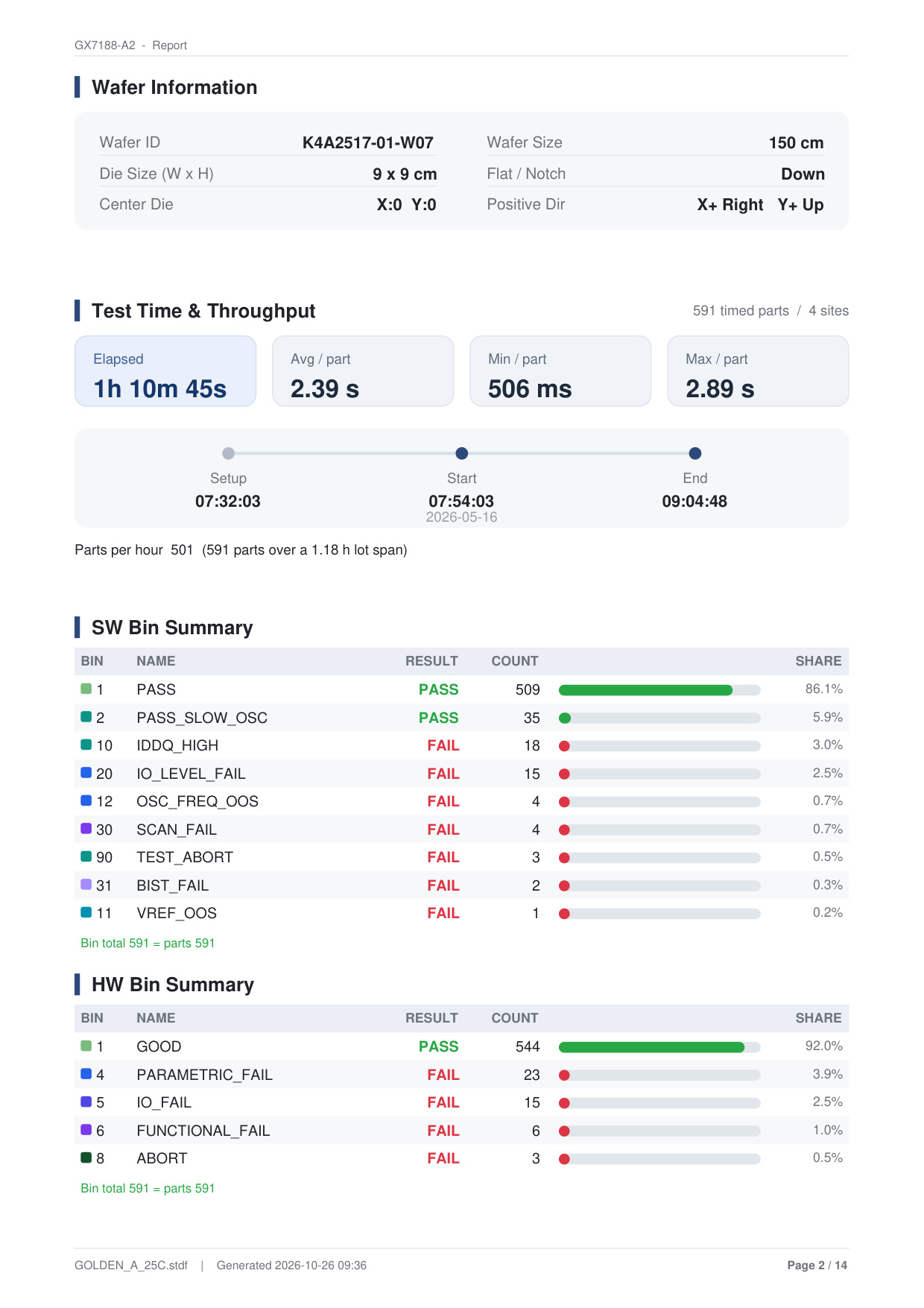
| Bin | Name | Result | Count | Share | Description |
|---|---|---|---|---|---|
| Bin 1 | PASS | PASS | 509 | 86.1% | Full specification pass |
| Bin 2 | PASS_SLOW_OSC | PASS | 35 | 5.9% | Marginal oscillator speed within acceptable limit |
| Bin 10 | IDDQ_HIGH | FAIL | 18 | 3.0% | Standby leakage current violation |
| Bin 20 | IO_LEVEL_FAIL | FAIL | 15 | 2.5% | Digital I/O high-level output voltage (VOH) failure |
| Bin 12 | OSC_FREQ_OOS | FAIL | 4 | 0.7% | Oscillator frequency out of specification |
| Bin 30 | SCAN_FAIL | FAIL | 4 | 0.7% | Scan chain structural logic failure |
| Bin 90 | TEST_ABORT | FAIL | 3 | 0.5% | Test aborted during execution |
5. Fail Pareto & Multi-Site Yield Delta
Accelerating yield ramp requires immediately isolating the few vital failure modes. DLOG ranks failure items by count and share, bolding cumulative fallout up to 80% to focus corrective action.

Parallel Probe Site Yield Variance (Site Delta)
In multi-site testing, probe needle wear or contact resistance easily introduces site imbalance. DLOG calculates each site's delta against the lot average (92.05%):
- Site 1: Yield 93.33% (Delta +1.29%p, leading performance)
- Site 2: Yield 91.84% (Delta -0.21%p)
- Site 3: Yield 90.48% (Delta -1.57%p, lowest yield due to 6 IDDQ fails)
- Site 4: Yield 92.52% (Delta +0.47%p)
The Site x Fail Bin table highlights cells in bold red when a site experiences at least 2x the all-site failure rate with 3+ parts, warning engineers of probe card issues before yield drops further.
6. Item Statistics & Retest Recovery Rate
Summarizes full parametric measurements (Low Limit, High Limit, Min, Avg, Max, Cp, Cpk) and presents a dedicated Retest Analysis module.
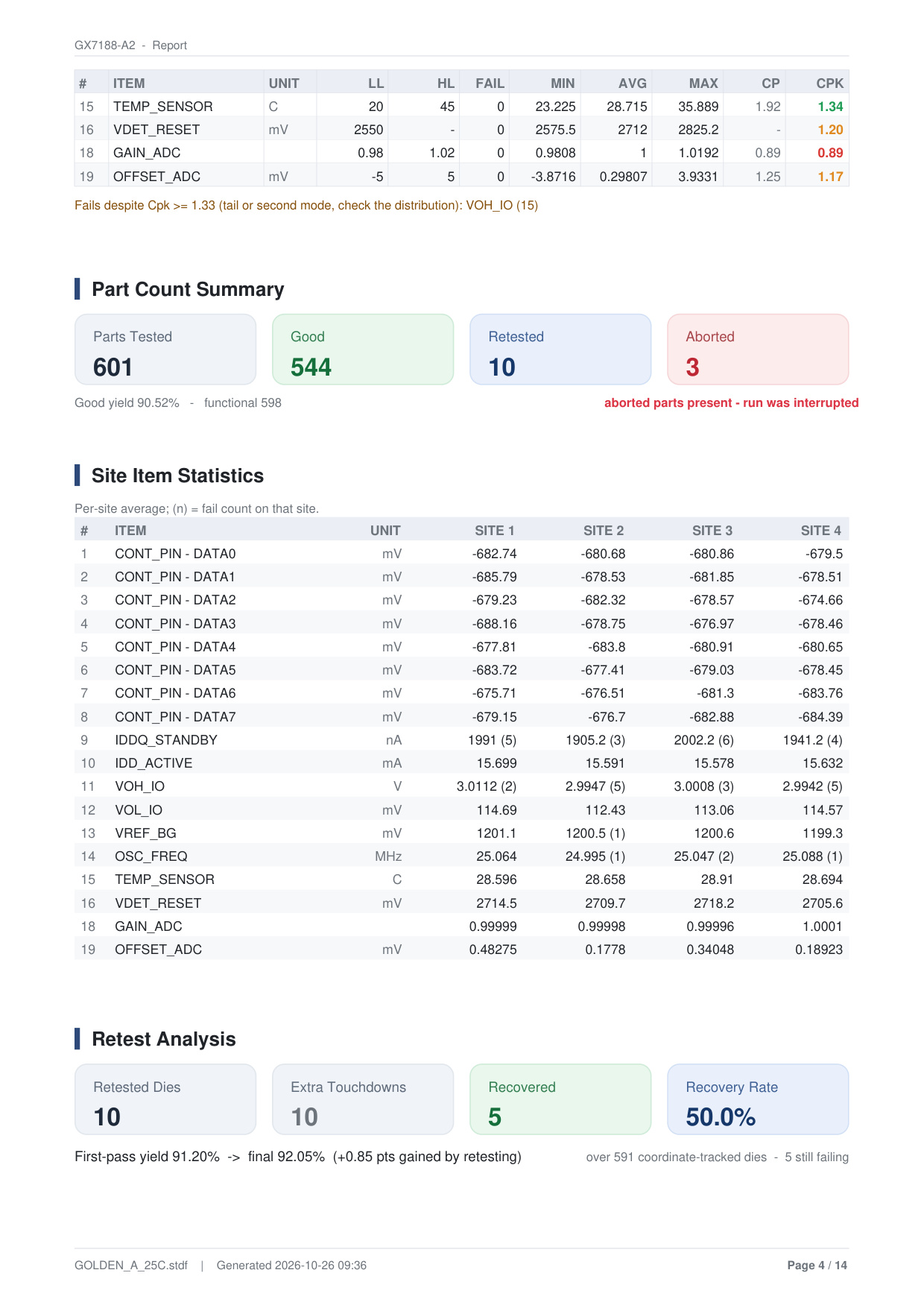
10 dies were retested via extra touchdowns, and 5 dies recovered to good units (50.0% recovery rate).
This lifted final yield from 91.20% to 92.05% (+0.85%p gain), proving the financial return on retest time.
7. Cpk Ranking (Worst First) & Automated RCA
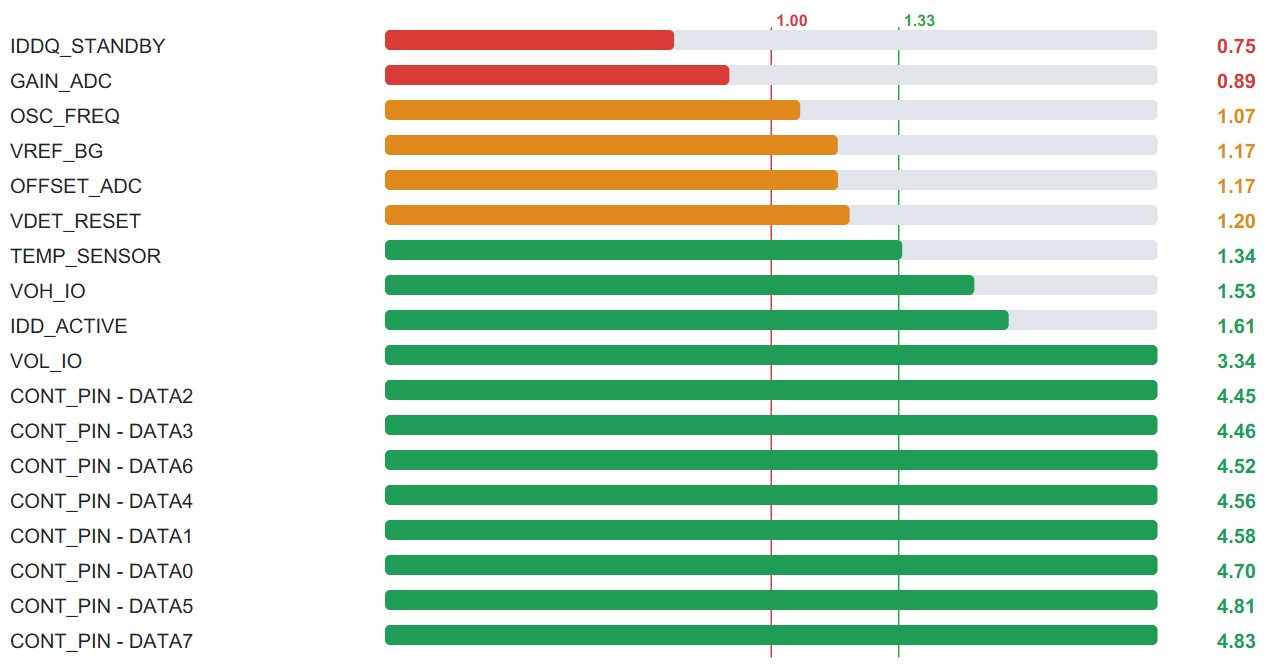
Ranks all parametric tests from worst to best capability. Reference lines at 1.00 (minimum allowable) and 1.33 (standard capable target) instantly identify high-risk tests.
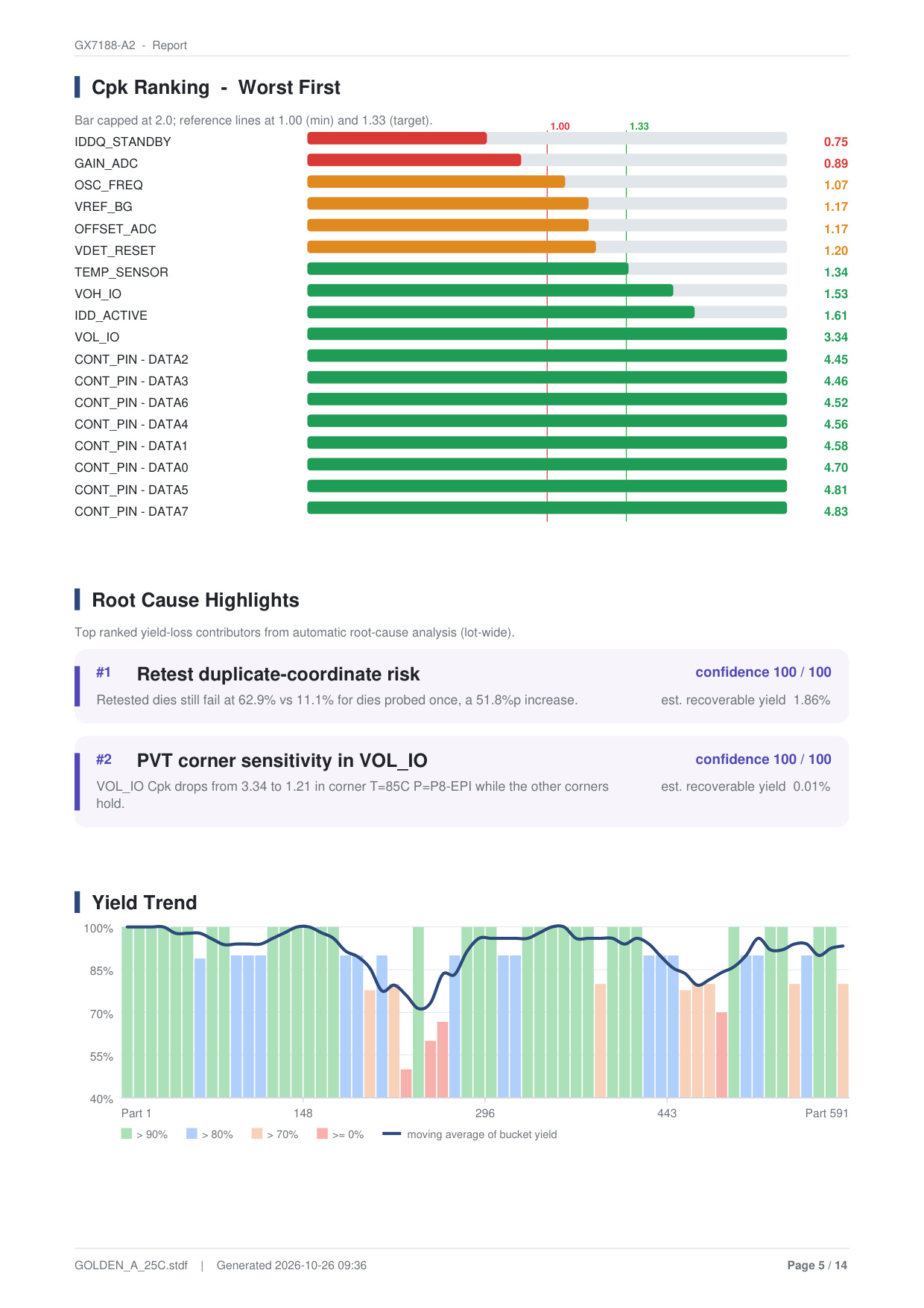
Automated Root Cause Analysis (RCA Engine)
DLOG's RCA engine scans the full dataset to automatically isolate the root cause behind yield fallout alongside statistical confidence scores:
- #1 Retest duplicate-coordinate risk (Confidence 100/100, Est. Recoverable Yield 1.86%): Retested dies fail at 62.9% vs. 11.1% for dies probed once, flagging coordinate retest damage.
- #2 PVT corner sensitivity in VOL_IO (Confidence 100/100): VOL_IO Cpk drops from 3.34 at room temperature to 1.21 at hot corner (T=85°C, P=P8-EPI).
8. Yield Trend & Test Time Trend
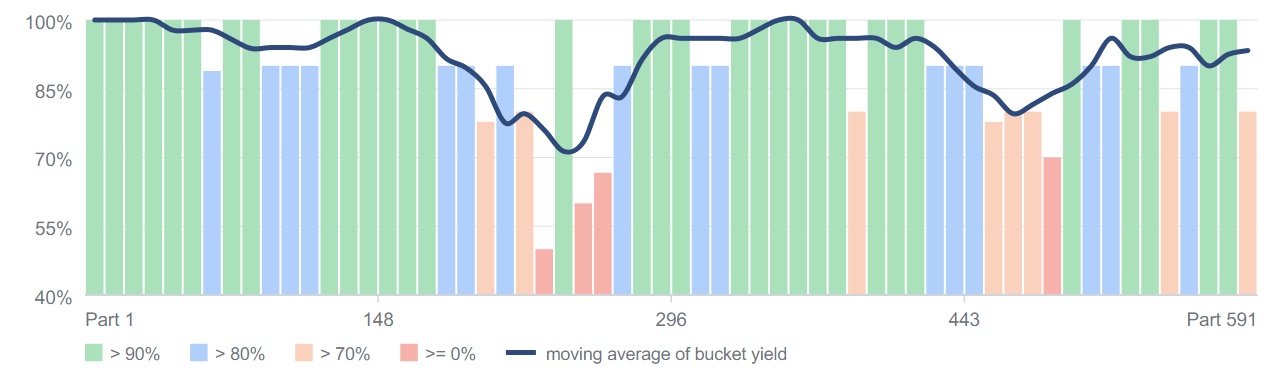
Tracks yield variations and test-time stability chronologically over test sequence buckets, revealing yield dips during probing runs.

9. Distribution Histograms & Limit Audit
Plots empirical frequency histograms with fitted normal distribution curves for the 8 weakest Cpk tests, comparing sample spread against Test Low/High limits.


Limit Audit
Audits all test limits to eliminate guard-band errors:
YLD (Yield-Limiting):Actual yield fallout occurring at this limit (IDDQ_STANDBY, VOH_IO, OSC_FREQ).LSE (Loose Limits):Cpk exceeds 3.0~4.8, indicating limits are too loose to screen latent defects (CONT_PIN tests, VOL_IO).NOL (No Limit):No test limits specified in STDF (ILEAK_IO_HI).1SD (One-Sided):Single-sided specification limit (VDET_RESET).
PDF Pages 6 & 7 Layout


10. Spatial Failure Enrichment & First-Fail Waterfall
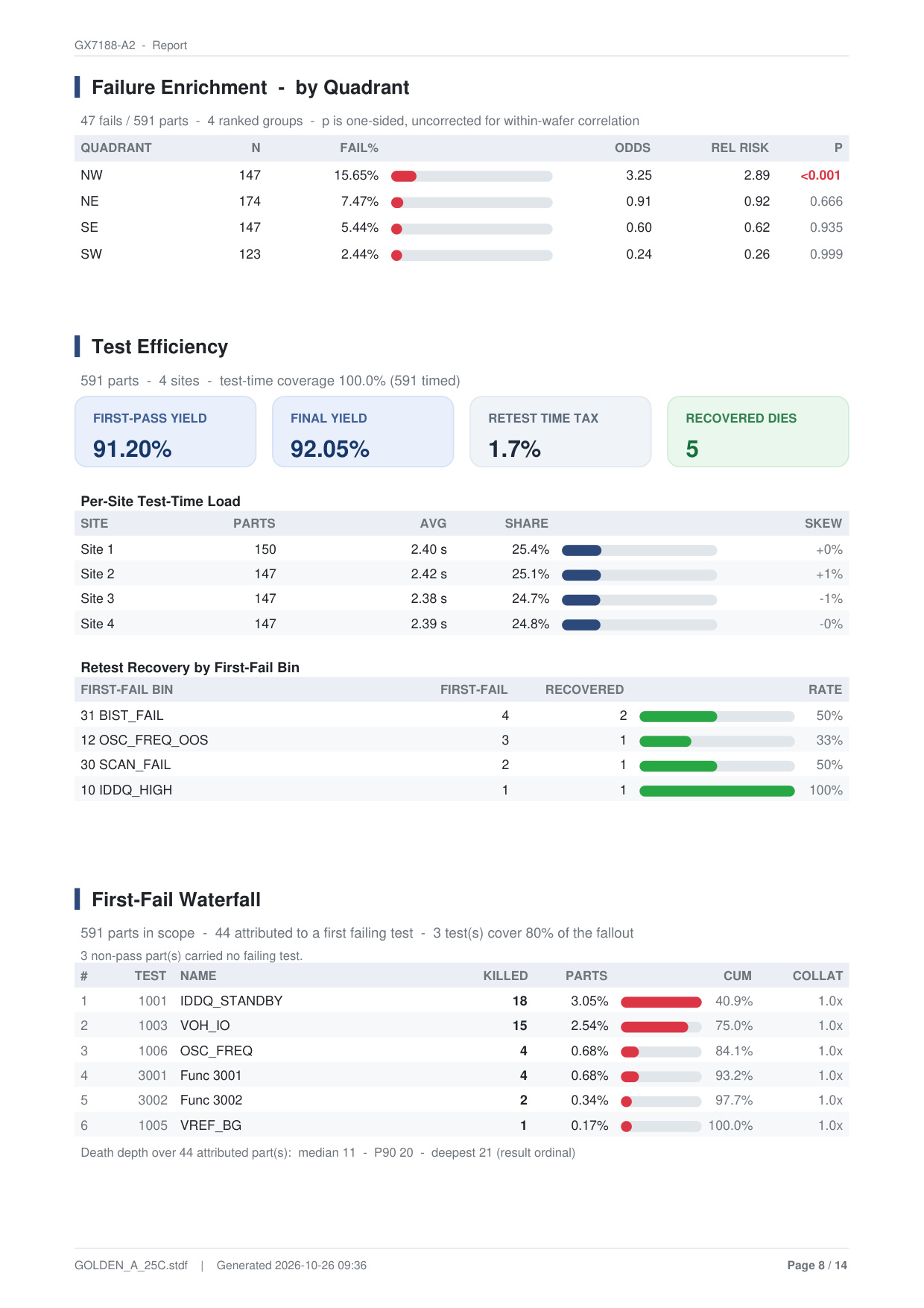
Evaluates whether failures are distributed randomly or clustered geographically across wafer quadrants using rigorous statistical tests.
Quadrant Failure Analysis
- NW Quadrant: 15.65% fail rate (23 of 47 fails), Relative Risk 2.89x, Odds 3.25,
p < 0.001, proving statistically significant chamber/slurry non-uniformity! - NE Quadrant: 7.47% fail rate, Relative Risk 0.92, p=0.666.
- SE Quadrant: 5.44% fail rate, Relative Risk 0.62, p=0.935.
- SW Quadrant: 2.44% fail rate, Relative Risk 0.26, p=0.999 (highest yield quadrant).
First-Fail Waterfall: Identifies that 84.1% of defective dies fail at just 3 tests (IDDQ_STANDBY 40.9% + VOH_IO 34.1% + OSC_FREQ 9.1%), indicating clear test sequencer optimization opportunities.
11. ANOVA Group Analysis & Correlation Explorer
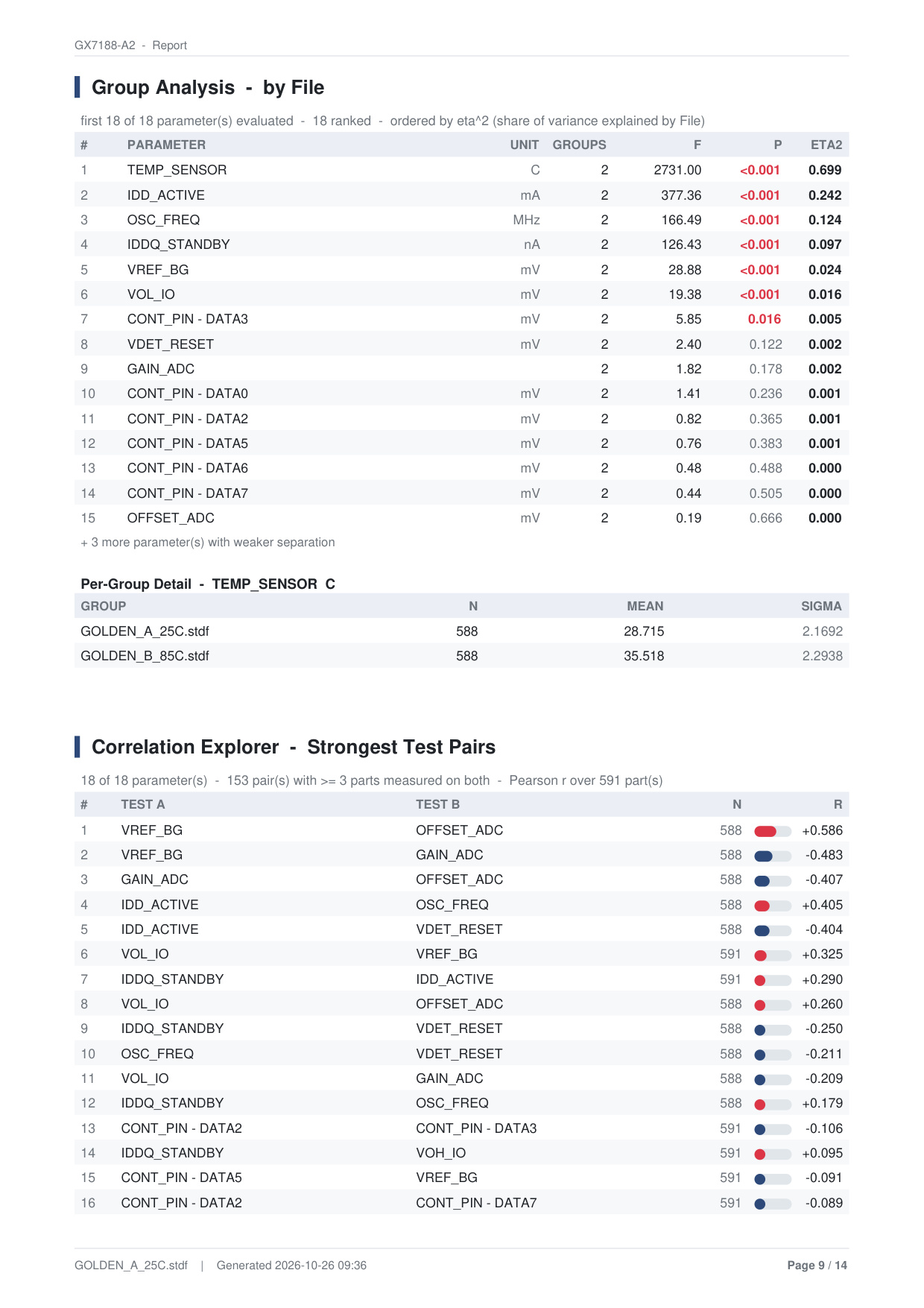
Measures variance across datalog files via One-way ANOVA and effect size (Eta-squared, η²), while mapping test interdependencies via Pearson r correlations.
Key Correlation Test Pairs
VREF_BG ↔ OFFSET_ADC (r = +0.586):Strong positive correlation; ADC offset tracks bandgap reference voltage.VREF_BG ↔ GAIN_ADC (r = -0.483):Negative correlation between reference voltage and ADC gain.IDD_ACTIVE ↔ OSC_FREQ (r = +0.405):Operating current rises proportionally with internal clock frequency.IDD_ACTIVE ↔ VDET_RESET (r = -0.404):Negative correlation between reset threshold voltage and active current.
12. Reticle Average Map & Wafer Diff Map
Identifies stepper lens aberrations across reticle exposure shot cells and traces die coordinate transitions between wafers.

- Reticle Average Map (5x2 Shot Grid): Cell (0, 0) exhibits 83.33% yield (-8.71%p delta), while cell (3, 1) achieves 98.33% (+6.29%p), isolating stepper lens distortion at the reticle corner.
- Wafer Diff Map: Compares 197 coordinates between Wafer 1 and Wafer 2, highlighting 22 regressed dies (A Pass → B Fail) and 6 recovered dies (A Fail → B Pass).
13. High-Res Wafer Map · Gallery · Bin Map
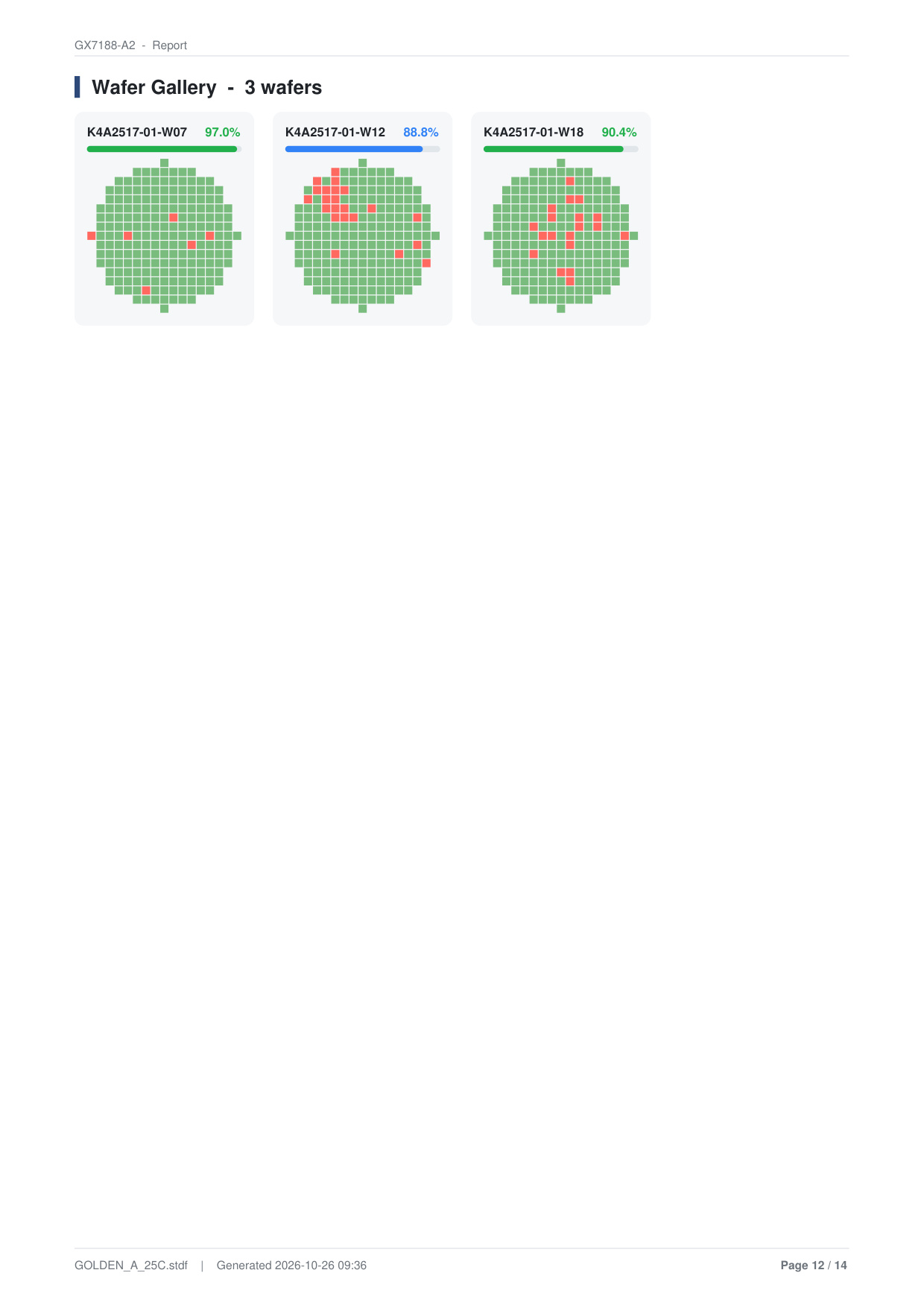
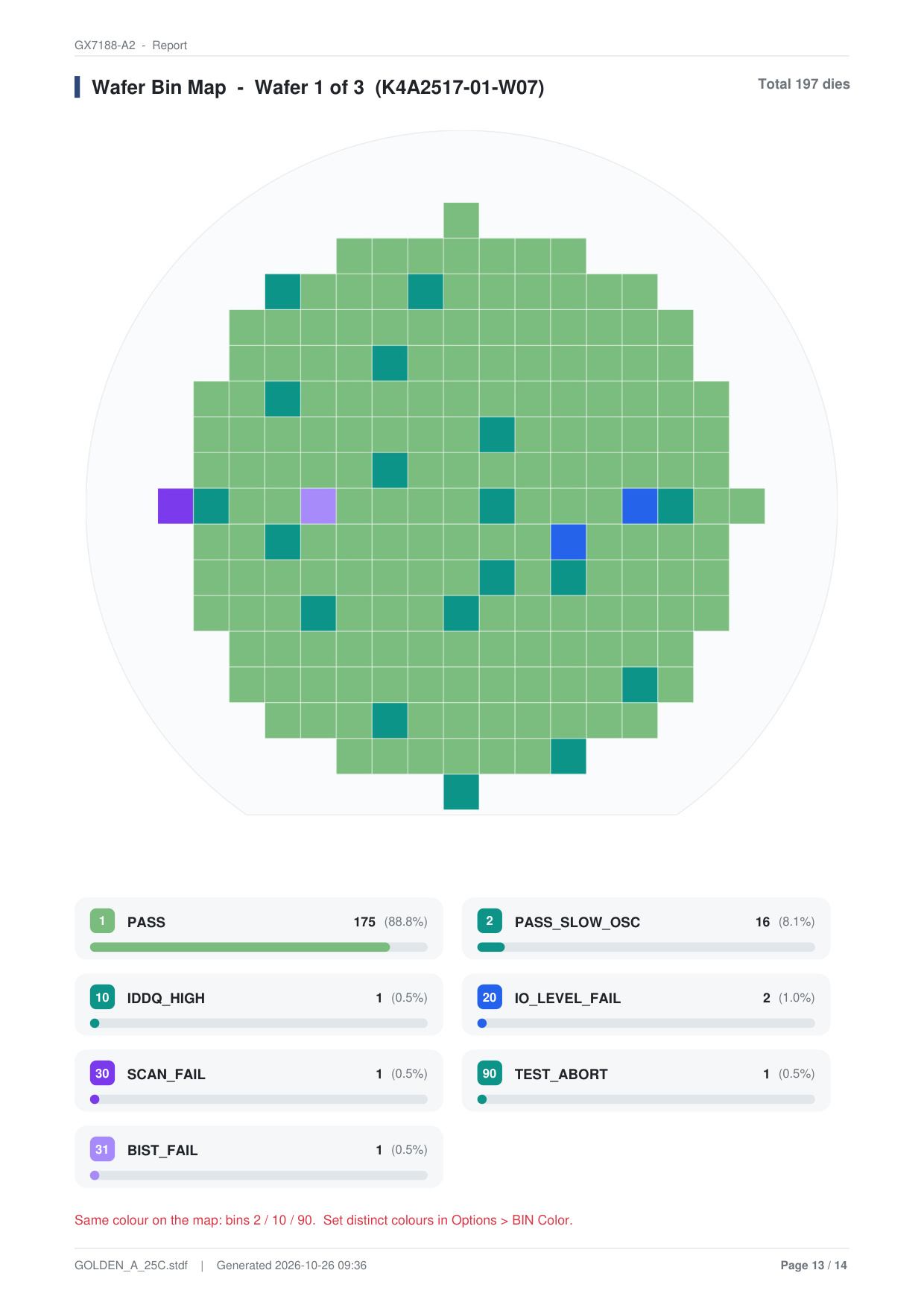
DLOG generates publication-grade wafer maps across three formats in PDF, Word, and Image exports.

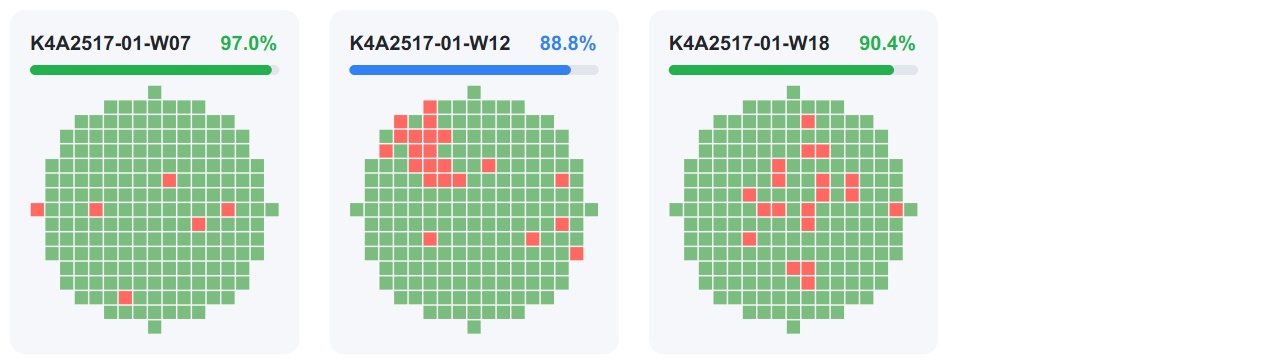

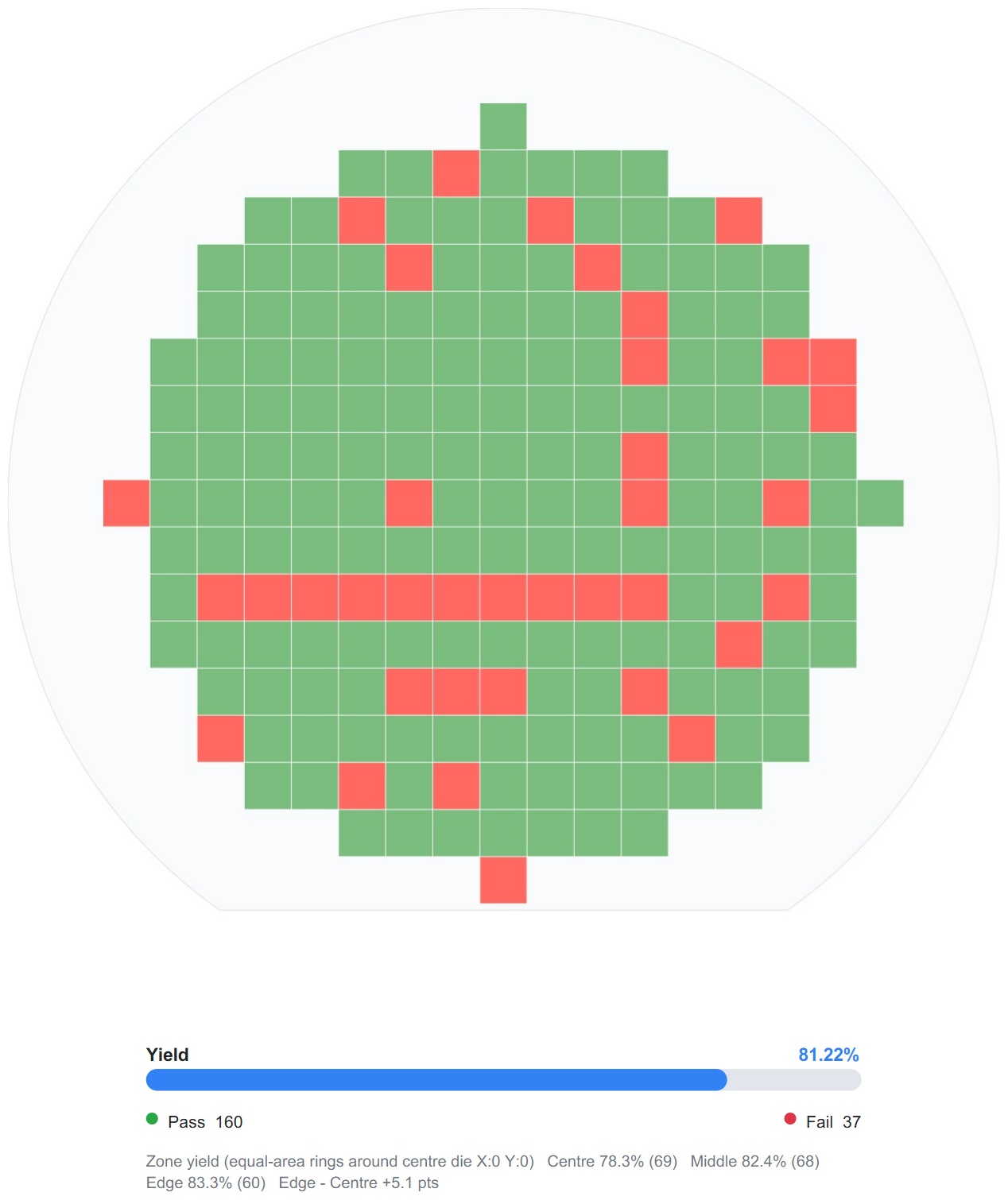
Equal-area concentric rings around the wafer center (Center, Middle, Edge) detect edge-fallout versus center-die clustering (Edge - Center delta calculated automatically).
PDF Pages 11..14 Full Layout

14. Structured Excel (.xlsx) Workbooks
Engineers requiring pivot tables or downstream database ingest can export a structured three-sheet workbook.


Three-Sheet Architecture
- Sheet 1: 'Report' — Summary metrics, lot info, SW/HW bin summaries, Pareto rankings, and item statistics.
- Sheet 2: 'Table View' — Complete die coordinates (X, Y), bin numbers, test execution times, verdicts, fail items, and measured values across all pins and tests.
- Sheet 3: 'Wafer Bin Map' — Spreadsheet cells formatted as a 2D physical wafer grid with background fill colors representing software bins.
15. Word · Image · PAT Reports
Word Report — Editable PDF Alternative
When you need to deliver official documents with corporate headers, custom styles, or engineering remarks, export as a native Microsoft Word (.docx) document.
- Preserves Visual Layout: Keeps the exact table structures, headers/footers, and company logo placements identical to the PDF report.
- Embedded Graphics: All high-resolution charts and wafer maps are embedded as full images ready for presentation.
- Direct Commentary: Insert engineering conclusions and corrective action plans directly under the automated root-cause diagnostics.

Image Report — Share in a Single Visual
The Image Report saves the entire report as a single continuous vertical image (PNG or JPG). It is ideal for embedding into presentation slides, internal wikis, or chat messengers, with resolution selectable from Small to X-Large.
PAT Report — Inspect Outlier Limits Per Test Item
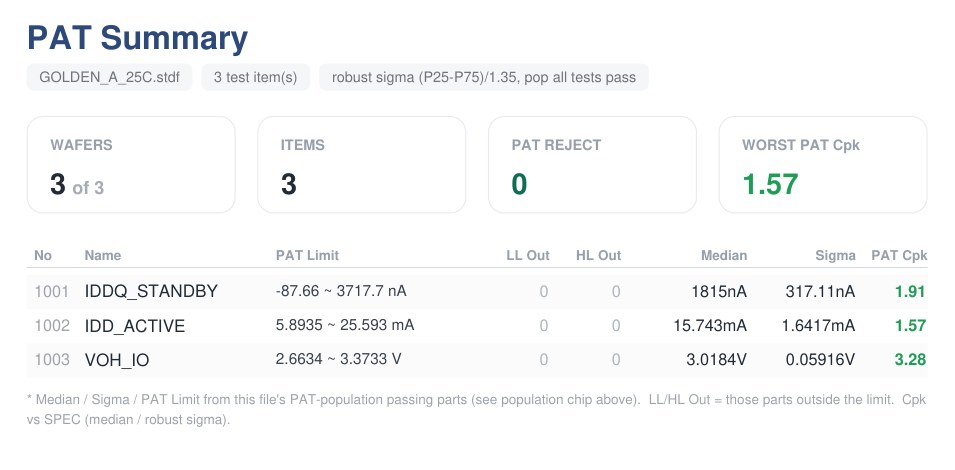
Part Average Testing (PAT) identifies statistical outlier dies that deviate significantly from the main lot distribution. The PAT Report is a dedicated standalone PDF showing where the outlier limits (PAT LL / HL) fall for each test parameter you select.
- Check PAT (PDF) in the Save Report dialog and click [Save Report].
- In the PAT Items window that appears, select the test parameters to include and configure Sigma L / H per test if desired.
- Click OK to export as
datalog_name_PAT_Report.pdf.
The resulting PDF contains 1 summary page + 1 page per selected test parameter. (In Lot scope, per-wafer breakdown pages follow each parameter.)
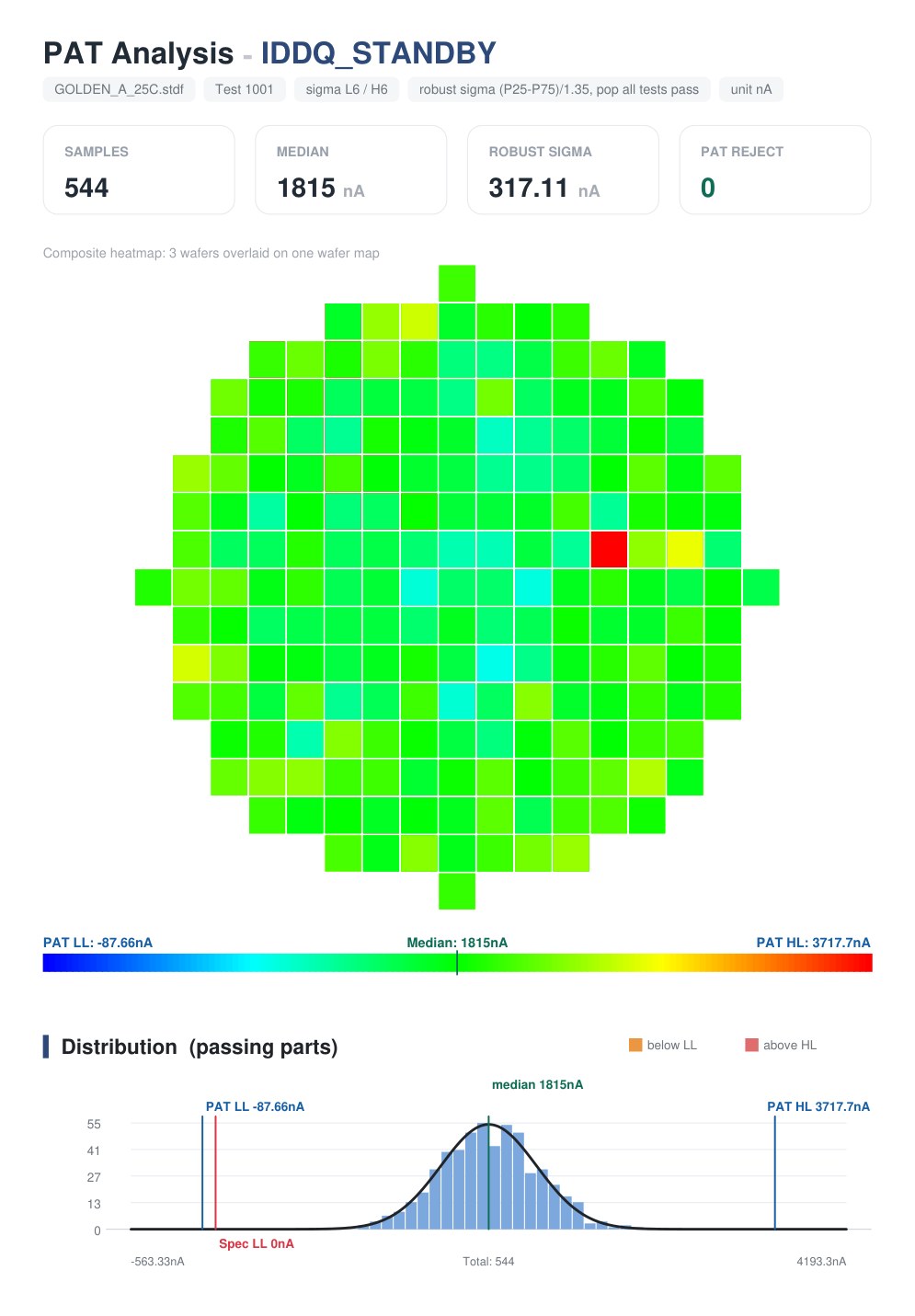
16. 85°C Temperature Corner Analysis (GOLDEN_A vs. GOLDEN_B)
Semiconductor circuit behavior shifts significantly with temperature, voltage, and process corners. Here is a real-world case comparing Room Temperature 25°C (GOLDEN_A) versus High Temperature 85°C (GOLDEN_B) STDF datalogs:


| Metric | 25°C Room Temp (GOLDEN_A) | 85°C Hot Temp (GOLDEN_B) | Engineering Root Cause & Diagnosis |
|---|---|---|---|
| Overall Yield | 92.05% (Pass 544 / Fail 47) | 82.74% (Pass 489 / Fail 102) | Failures increase 2.17x under thermal stress (-9.31%p yield drop) |
| Top Failure Mode | IDDQ_STANDBY (18 fails) | IDDQ_STANDBY (20), VREF_BG (20) | VREF bandgap failures spike from 1 to 20 units at high temperature |
| Weakest Cpk | IDDQ_STANDBY (Cpk 0.75) | OSC_FREQ (Cpk 0.67), VREF_BG (Cpk 0.68) | Internal oscillator slows down, crossing low limit |
| VOL_IO Capability | Cpk 3.34 (Capable) | Cpk 1.21 (Marginal warning) | Confirms RCA finding: I/O pulldown resistance increases at 85°C |
| Retest Recovery | 50.0% (5 of 10 recovered) | 32.0% (8 of 25 recovered) | Lower recovery rate at 85°C indicates permanent thermal degradation |
17. Preset Templates & Batch Export
To eliminate the hassle of manually checking and unchecking 34 switches every time, you can save frequently used section combinations under Template in the Save Report window.
- Tailored Presets: Save, load, and delete named section profiles such as 'Executive_Weekly', 'Full_Diagnostic', or 'Standard-QA' (names may contain letters, numbers, spaces,
_, and-). - One-Click Multi-Format Export: All selected formats (PDF, Excel, Word, Image, PAT) are created in the target folder with a single click, and you can open the files or destination folder immediately from the completion dialog.
18. Frequently Asked Questions (FAQ)
Q. How fast is report generation for large multi-gigabyte STDF files?
DLOG uses a high-performance, multithreaded C++ engine to decode STDF records and compile finished reports in seconds. Processing time depends on datalog size and the number of enabled sections; standard summary reports generate almost instantaneously, while deep statistical sections like Root Cause Highlights and MVA analysis perform comprehensive computations across all test items.
Q. Is there a die count limit in the Excel Table View sheet?
Any lot fitting within Microsoft Excel's standard limit (1,048,576 rows) is supported. Tens of thousands of dies are organized seamlessly with frozen parameter limit headers.
Q. Can DLOG generate reports on secure air-gapped fab PCs?
Yes. DLOG is 100% on-premises offline software. It requires no internet connectivity or cloud telemetry, keeping confidential semiconductor designs completely secure.
Q. Can multiple STDF files be merged into a single lot report?
Yes. Select the Lot scope switch to aggregate all loaded STDF files into a consolidated lot report with multi-wafer galleries and combined statistics.
Generate Professional Semiconductor Reports with DLOG
Eliminate manual spreadsheet formatting and custom scripts. Create publication-grade reports with Cpk rankings, wafer maps, Pareto charts, and limit audits in seconds. Enjoy 6 months of full-featured free access today.
Download DLOG Free for 6 Months →